Always do things on time with a Cron job.
No. This will not help you fix that exercise schedule. But you servers can sure get a lot of things done without needing human intervention.

Cron
A time-based task scheduler created for Unix-like systems with the purpose of executing system administration and maintenance tasks.
With advancement of technologies, it was found useful in other aspects of software development. This led to libraries and frameworks being built to implement Cron in different environments like web application development.
Let's talk about Cron as an abstract concept.
1. Cron Expression
To run something periodically, you need a way to define the period. In human terms, we would say daily, yearly, hourly, every Friday, every 3rd day, etc. And yes, you can do all this with Cron jobs as well. Let's look at one puzzling example
Full expression
0 0/50 13-14 ? JAN,MAR,JUL 2/3 2026/2
| Seconds | Minutes | Hours | Days of Month | Months | Days of week | Year |
| 0 | 0/50 | 13-14 | ? | JAN,MAR,JUL | 2/3 | 2026/2 |
| At second :00 | every 50 minutes starting at minute :00 | every hour between 13pm and 14pm | in January, March and July | every 3rd day of the week starting on Monday | every 2 years starting in 2026 |
The full description
"At second :00, every 50 minutes starting at minute :00, every hour between 13pm and 14pm, every 3rd day of the week starting on Monday, in January, March and July, every 2 years starting in 2026"
Yeah, I'm a bit crazy to puzzle you with this but easier things are easier to forget. So go figure it out. For a further explanation refer to Wikipedia
Some things to remember while making cron expressions:
- Sequence - Seconds Minutes Hours "Days of Month" Months "Days of week" Year
- Range is Indicated by "-"
- Start/Repetition are written like 5/10 - starts at 5 and repeats after every 10 units of time.
- Specific values - comma-separated values like "JAN, MAR, JUL"
- Leave anything blank with "?" - only works with Days of week and Days of month
- Repeat on every 1 unit of time - use an asterisk "*"
2. Crontab entry
A crontab file is a file containing job entries. You don't normally work with crontab files directly and rather use CLIs or programs to do so.
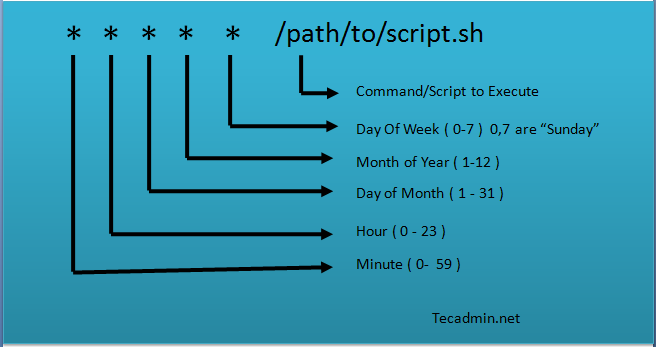
An entry contains the below format Expression Command
For e.g.
1 0 * * * printf "" > /var/log/apache/error_log
clears the Apache error log at one minute past midnight (00:01) every day
You can use any command here that can be run on a terminal. For e.g.
- Cleanup unused docker images.
- Start/stop programs.
- Query an API with curl.
3. Cron Daemon
If you're familiar with the concept of daemons, this will be easy to understand. A Daemon is a system program which once started keeps running in the background until stopped. Its purpose is to provide a platform - a set of common services - for tasks to run on top of it.
Now that you have defined your expression and tasks, the daemon connects the dots for you.
In this case, the daemon's responsibilities are:
- Read a list of cron jobs from a source (crontab file in linux)
- Use the cron expressions of the job to calculate the timestamp when these tasks will run next and maintain it in memory (called an event time list)
- Loop through the tasks in the event list
- Sleep until there is a task to run.
- Wake up and run the next task.
- Once task is started, calculate the next timestamp of the same task and put it in the event list.
- Repeat for the next task.
Now that you know how cron works, lets look at some of its use cases:
- CI/CD - deploying at a fixed time.
- Cache expiry/re-bake - Clear or re-create cache after an interval.
- Reminders and Newsletters - Send emails at a point in time or at regular intervals.
- SysAdmin tasks - Daily backups, security scans, auto-shutdown servers, etc.
Hope you found this small introduction to cron useful and it adds value to your day to day solutioning.
Here are some useful resources to get you to the next level:
- Create and validate cron expressions with FreeFormatter
- Learn and experiment with cron on Linux
- Checkout how to use node-cron to run cron job with JavaScript.
Stay tuned for more.
You can connect with me on Twitter


